Voxel Block Builder Personal Worlds Guide
Save builds, stage galleries, and know when to jump back to public servers.
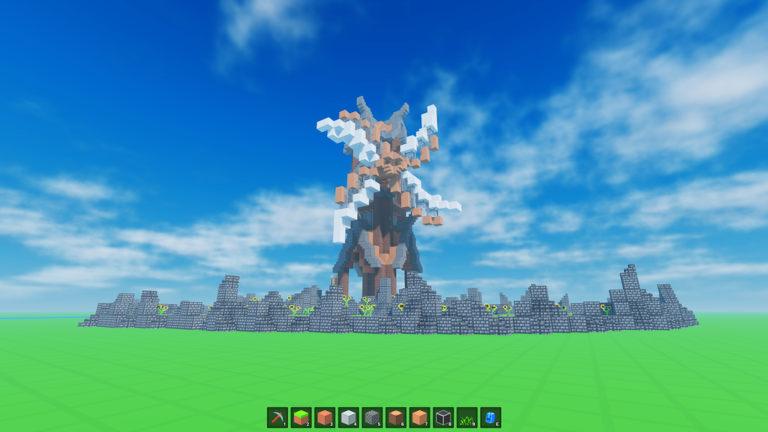
Personal Worlds are the persistence layer of Voxel Block Builder on Roblox. Public servers (max 18 players) deliver chaos, collaboration, and surprise neighbors; Personal Worlds deliver a space where your placements are meant to remain between sessions. This guide explains how to treat Personal Worlds as a save-driven studio while still enjoying online co-op. New to the loop? Read Getting Started and how to build alongside this page.
What Personal Worlds are for
- Long-term houses, cities, parks, and showcase museums
- Palette experiments you refuse to lose overnight
- Quiet focus when public chat and traffic distract you
- A clean stage for pet showcases once Verity is equipped and rolling alongside you
They are still part of Roblox’s online stack—not a promise of a totally offline single-player mode—but they are the correct answer to “how do I save my build?”
Personal Worlds vs public servers
| Need | Prefer |
|---|---|
| Save progress / gallery | Personal World |
| Meet builders, jam live | Public server (≤18) |
| Stress-test designs with traffic | Public, then copy ideas home |
| Record tutorials / screenshots | Personal World (control the frame) |
| Spend Robux on passes calmly | Either; fewer distractions in Personal |
Many players keep a “draft lot” habit: prototype in public for fun, rebuild keepers in a Personal World the same day. Use the world save checklist before you log off.
Session workflow that actually sticks
- Enter your Personal World from the experience flow.
- Set a single goal (finish roof, pave plaza, sort storage wall).
- Work the Inventory → place → pickaxe loop with intent (controls if inputs feel fuzzy).
- Mid-session, walk a full orbit around the build—on foot or with Fly Ability [OP] if owned.
- End with screenshots and the save checklist, not with a random shop scroll.
Optional tools: build checklist for creative goals; blocks when choosing materials; weekly blocks when integrating new drops after you like/favorite the game.
Saving discipline (do not skip)
Roblox experiences can still punish assumption. Leave time to confirm your world state before quitting. If you invited friends for a tour, note whether their edits are intended to stay. After large deletions with the pickaxe—especially Bombastic Pickaxe with longer reach—walk the site once more before you call it done.
If you also play elsewhere the same night, finish the Voxel Block Builder save first. Context-switching mid-mine is how heroic castles lose a wall and nobody notices until tomorrow.
Designing a Personal World like a campus
- Spawn plaza — flat welcome pad with a sign wall of your rules or color legend.
- Active lot — the current project with scaffolds and temporary guide lines.
- Museum row — finished miniatures you refuse to overwrite.
- Palette garden — swatches of Rainbow / glass / weekly materials for planning.
- Pet loop — a smooth path for Verity to roll/follow when equipped (pets, Verity update).
- Portal corner — cosmetic or pass-related nods to Blue Dimension if that content matters to you.
Zoning prevents the “everything is unfinished everywhere” feeling that kills motivation.
Game Passes that change Personal World feel
- Fly Ability [OP] (299) — roofing and aerial screenshots.
- 2x Sprint Speed (49) — crossing large campuses.
- Rainbow / Colored Glass packs (199 / 89) — accent language for museum lighting.
- Bombastic Pickaxe (99) — terraforming and mega demolish jobs.
- The Blue Dimension (29) — extra content lane when you want a change of scenery.
None are required to save builds. Shop thoughtfully with Game Passes and the Game Pass tier list.
Codes, scripts, and other distractions
Personal Worlds are not unlocked by promo codes. The Codes Hub currently lists no reliable active codes; redeem flow remains documented under how to redeem and finding new codes. Never install a “world duplicator” executor—see scripts. Official news: official links.
Co-op etiquette around saves
If you show friends a Personal World, agree whether they may edit. If you collaborate heavily, consider building shared pieces on a public server first, then appoint one person to rebuild the canonical version in their Personal World. Clear ownership prevents drama when eighteen-player energy follows you home.
Troubleshooting mindset
- Build missing? Confirm you rejoined the same Personal World context, not a fresh public server.
- Lag while detailing? Reduce particle-heavy effects, simplify glass spam, or split the campus.
- Lost motivation? Shrink the active lot; finish a micro landmark from the how to build recipes.
Personal Worlds turn Voxel Block Builder from a amusement-park visit into a sketchbook you can reopen after school or work. Protect that sketchbook with deliberate saves, then invite the public servers back in when you want noise, neighbors, and collaborative sparks.
Frequently Asked Questions
Quick answers about Voxel Block Builder on Roblox.
Do Personal Worlds replace public servers?
No. Use Personal Worlds to save and curate; use public servers (max 18) for social and live co-op building.
Can I keep builds without buying a Game Pass?
Yes. Personal Worlds are part of normal play. Passes change movement, palette, or dimensions—not the basic ability to save.
What checklist should I run before quitting?
Use the world save checklist: confirm you are in the right world, finish destructive mining, screenshot, then exit cleanly.
Should weekly blocks go straight into my museum row?
Test them on the active lot first. Promote a piece to the museum only after you like the silhouette and palette pairing.
Is a Personal World required to redeem codes?
No. Codes redeem from normal sessions when available. Personal Worlds are for builds, not code gating.